Lets try Notion AI
I haven’t written a blog in quite some time. Today, I have the opportunity to write about Notion AI. I’ve been using Notion for many years to manage various tasks, making it my number one note-taking app that I open every day. Importantly, it now has AI to make life even better in many ways.
Notion AI
Notion AI is a cool new feature on the platform that boosts productivity and helps you whip up content in no time. Whether you’re summarizing stuff, writing articles, or doing some basic data analysis, Notion AI can save you time and make your workday smoother. In this article, I’ll share my experience with Notion AI and give you some tips on how to easily incorporate it into your daily routine and work.
For this blog, I’ll highlight the features I use frequently in my daily life. While there are many other features, these alone make life so much more convenient! The features I often use include summarizing long articles, managing schedules, and creating daily to-do lists. Plus, Notion AI helps me quickly analyze preliminary data, making my decisions more efficient. There’s also a fantastic writing feature that lets me create high-quality content quickly and easily, saving me a lot of time.
The more I use Notion AI, the more I find it to be a fantastic tool that can tailor and enhance our work in so many ways, whether it’s office tasks, learning, or even managing our personal time.
Notion AI is super handy because it fits right into our workspace, making it easy to find documents, notes, articles, and all sorts of records.
Get the answer in seconds.
Just like a general chat AI, we can ask about all sorts of topics. But what’s even better is that we can ask about anything within our workspace. Whether it’s information from our notes, schedules we’ve crafted, to-do lists, or even summaries of lengthy articles, Notion AI can quickly and accurately find what we need. This not only saves us time but also boosts our work efficiency significantly.
By recording tasks or any information related to dates and times, we can easily ask Notion AI for help. Whether it’s checking appointment schedules, getting reminders about tasks, or managing our schedules, Notion AI is here to quickly and accurately provide the information we need. This way, we can manage our activities efficiently and never miss an important deadline.
Find the right words, right now.
Let’s chat about writing! Managing articles, writing, or editing can be a breeze. Plus, there’s no need to copy and paste; you can enter it directly into notes. Notion AI is here to help us pick the perfect words and craft meaningful and fluent sentences, making writing smoother and even better. It can also assist in checking and correcting grammar, or even suggesting ways to enhance the content. How cool is that?
Using Notion AI to write articles is a great way to save time finding just the right words or sentences. It helps us quickly create quality and engaging content. No more tedious copying and pasting from other sources—everything is more convenient and efficient. Plus, Notion AI assists in generating new content, so we don’t have to come up with everything on our own. This makes writing easier and a lot more fun!
One of the features I love using is summarizing information. Whether it’s lengthy articles or detailed messages, Notion AI can help summarize this information, making it easier and quicker to grasp. Plus, if we have notes that are a bit too long or information from multiple sources that need condensing, Notion AI can handle it efficiently for us.
Or we can have Notion AI summarize the information into tables as needed, making it much easier to organize various data systematically and understand it better. Plus, summarizing information in table format lets us conveniently compare data from multiple sources and use it for analysis or decision-making more effectively. This way, managing information in daily life becomes easy and stress-free.
Furthermore, Notion AI can translate languages too! If we have text in a foreign language, it can translate it into Thai accurately and quickly. This makes working with information from foreign sources super convenient, eliminating any language barriers.
Another feature that I really enjoy using is changing the tone of the text. If we want the text to have a serious, polite, or friendly tone, we can simply tell Notion AI. Plus, if our text is a bit too short and we want to expand it, or if it’s a bit too lengthy and we want to trim it down, we can adjust it as needed. Whether it’s writing articles, answering emails, or taking notes, this feature makes it super easy and quick to tweak the text to suit the situation and our needs perfectly.
Other Capabilities
Notion AI might have a few limitations, especially when it comes to data processing and analysis outside of articles. But don’t worry! Its strengths really shine through when working with articles. Notion AI helps us create content efficiently and quickly. For example, it can summarize information from long articles, check and correct grammar, and choose just the right words to make sentences meaningful and fluent.
Sometimes, when we’re feeling a bit bored or uninspired, Notion AI can be a fantastic tool to spark our creativity. For instance, you can use it to write songs that are both interesting and melodious, or compose poems filled with deep meaning and charm. Plus, Notion AI makes it super easy to craft stories with engaging and creative plots, or even whip up short tales that are entertaining and captivating. Give it a try and see where your imagination takes you!

Additionally, if our ideas are a bit unclear or underdeveloped, Notion AI is here to help! It can assist us in processing and expanding those thoughts into concrete forms. Whether it’s creating logically connected content or refining the wording to be clearer and more to the point, Notion AI has got our back.
Additionally, Notion AI can help us create data tables and easily compare data from multiple sources, making our data analysis and decision-making much more efficient. While Notion AI does have some limitations that may not make it perfect for every situation, its features for handling articles are still incredibly useful and can really boost our productivity.
Notion AI connectors beta
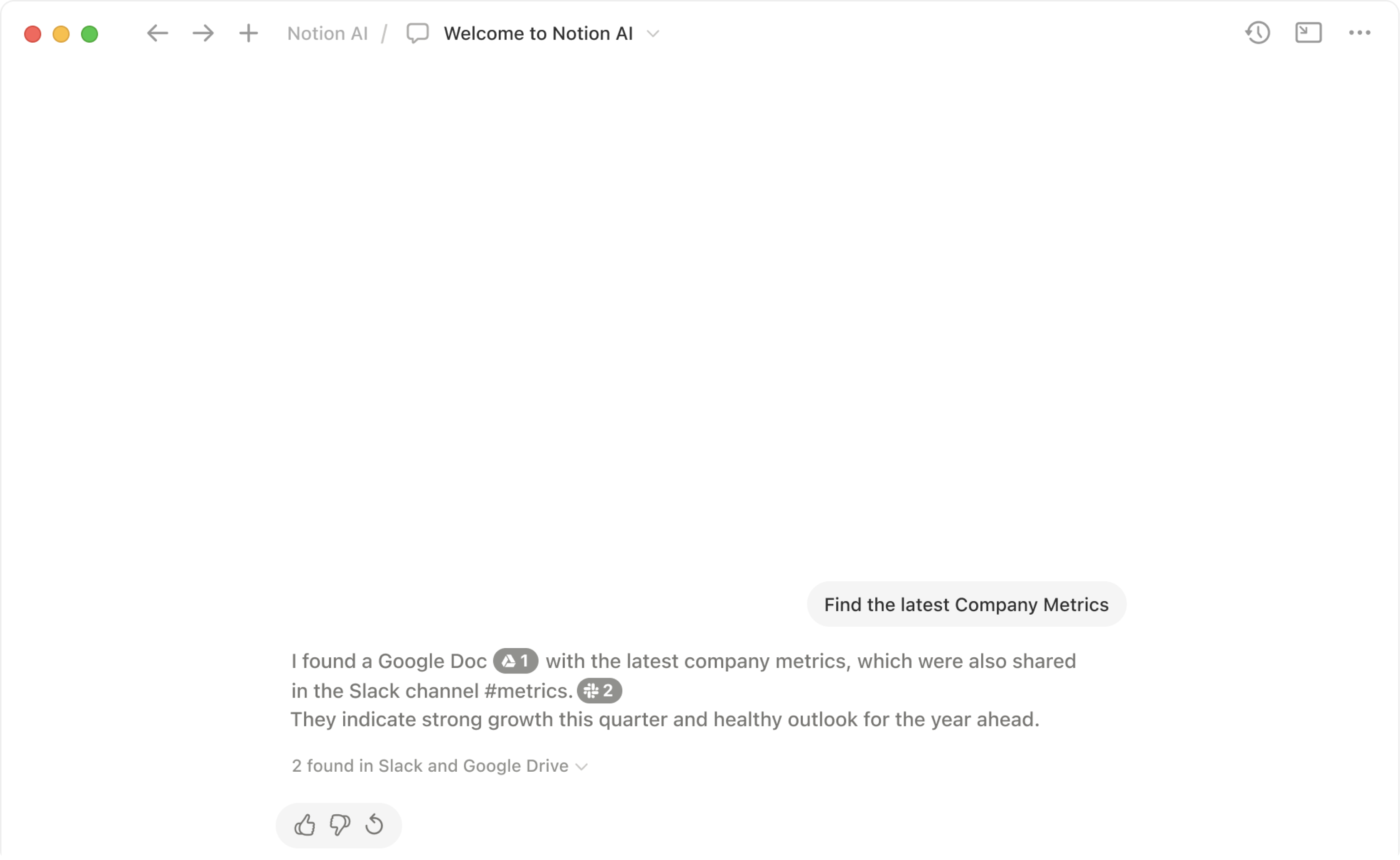
With Notion AI connectors, you can use Notion as a single place to find the information you need — even if it lives outside your workspace 👣
Let’s dive into the exciting new features that Notion has introduced! Notion AI connectors are currently in beta, allowing us to integrate our favorite services like Slack, Github, and Google Drive. More apps are likely to join the party soon!
If we integrate it with various apps, we can ask Notion AI directly. It will look at the data in the apps we’ve linked and given permission to, and then provide us with answers. Check out the video below.
If we integrate it with various apps, we can ask Notion AI directly. It will look at the data in the apps we’ve linked and given permission to, and then provide us with answers. Check out the video below.
How’s it going? There are still many features. Give them a try.